Brushflow: A Bold Display Font for Web Design
The Power of a Strong Typeface in Digital Design
As a web designer, I understand the importance of typography in shaping the user experience. The right font can elevate a design from good to great. Brushflow is a display font that stands out with its bold and dynamic style. It’s not just another typeface—it's a tool that can transform your digital projects with its unique personality and visual impact.
What Makes Brushflow Unique?
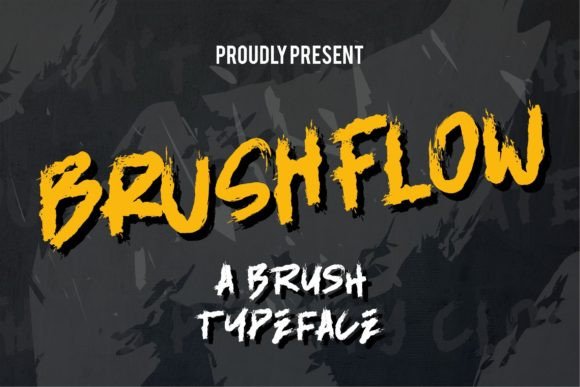
Brushflow is designed to be both eye-catching and versatile. Its thick, flowing strokes give it a modern yet artistic feel, making it ideal for creating attention-grabbing headers or promotional content. The font has a strong presence, which makes it perfect for use in areas where you want to make an immediate visual statement.
One of the key strengths of Brushflow is its ability to convey confidence and energy. Whether you're designing a landing page, a social media graphic, or a product banner, this font adds a sense of movement and dynamism that can help your message stand out.
Where to Use Brushflow Effectively
Brushflow is best suited for large text elements such as hero sections, call-to-action buttons, and section headings. It works particularly well in high-impact areas where you want to draw the user’s attention quickly. For example, using Brushflow as the main title on a creative portfolio site can instantly communicate the designer’s bold and innovative approach.
It’s also excellent for short phrases like taglines or headlines in marketing campaigns. When paired with a simpler sans-serif font for body copy, Brushflow creates a striking contrast that enhances readability while maintaining visual interest.
- Hero Sections: Use Brushflow for a powerful first impression.
- Call-to-Action Buttons: Make your CTAs pop with a bold font choice.
- Logos and Branding: Brushflow can be used as a logo font for brands that want to project strength and creativity.
- Banners and Ads: Ideal for online store banners or digital ads where visibility is key.
- Blog Headers: Add a fresh and modern look to your blog posts.
Readability and Usability Considerations
While Brushflow is visually striking, it’s important to consider how it performs in different contexts. On mobile screens, it’s best to use it sparingly—reserving it for headers and titles rather than body text. This ensures that the font remains legible without overwhelming the reader.
For small buttons or text overlays on images, Brushflow can still work well if the contrast is sufficient. However, it’s always a good idea to test the font across various screen sizes and backgrounds to ensure optimal readability.
When using Brushflow on dark backgrounds, ensure there’s enough white space to prevent the text from blending in. Conversely, on light backgrounds, the font’s boldness can create a strong focal point without being too harsh.
Font Pairing and Stylistic Balance
Brushflow is a display font, so it should be used thoughtfully to maintain balance in your design. Pairing it with a clean sans-serif or serif font for body text helps create a harmonious contrast. This pairing is especially effective for editorial-style websites or brand-focused content where a mix of styles can enhance the overall aesthetic.
For a more professional look, consider pairing Brushflow with a simple sans-serif font like Montserrat or Roboto. This combination allows the boldness of Brushflow to shine while keeping the rest of the content easy to read and visually balanced.
If you’re aiming for a more artistic or handcrafted feel, pairing Brushflow with a serif font like Playfair Display could add depth and sophistication to your design.
Brushflow in Brand Identity and Marketing
Brushflow is a great choice for brands that want to project confidence, creativity, and a modern edge. It’s particularly well-suited for creative industries such as design, fashion, and lifestyle. Using Brushflow in your branding materials can help reinforce your brand’s personality and make your content more memorable.
In a course sales page, for instance, Brushflow can be used to highlight key benefits or special offers. It adds a sense of urgency and excitement that can drive conversions. Similarly, in a boutique online store, the font can help create a cohesive and stylish brand identity that resonates with your target audience.
Technical Considerations for Web Designers
When incorporating Brushflow into your projects, make sure to check the available file formats and webfont options. Most premium fonts come with multiple weights and styles, which can be useful for creating a consistent typographic system across your website.
Ensure that the font supports the languages and characters relevant to your audience. This is especially important if you’re targeting international markets or working with multilingual content.
Finally, always verify the commercial licensing terms for Brushflow. Since it’s a premium font, proper licensing is essential for use in client projects, online stores, and other commercial applications.